UCG Fiber: A Complete Guide to Ubiquiti’s 10G Cloud Gateway for Modern Networks
A Smart 10G Gateway Built for Fast Modern Networks
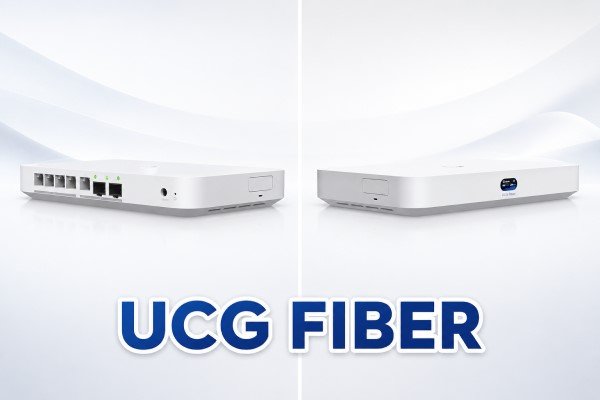
Ucg fiber, officially known as Ubiquiti UniFi Cloud Gateway Fiber or UCG-Fiber, is a compact 10G cloud gateway designed for users who want faster routing, stronger network control, and a cleaner UniFi management experience. It is not just a basic router. It is a gateway, network controller, security device, and optional storage-based UniFi application host built into a small desktop unit.
The product is mainly built for advanced home networks, small offices, creators, IT consultants, and businesses that need high-speed internet handling without moving directly to a full rack-mounted system. With 10G connectivity, multiple 2.5 GbE ports, SFP+ support, security features, VPN options, and UniFi application support, UCG Fiber sits in a useful space between simple home gateways and larger business-grade appliances.
What Is UCG-Fiber?
UCG-Fiber is a UniFi Cloud Gateway made by Ubiquiti. It works as the central device that controls routing, security, VLANs, VPNs, internet failover, UniFi devices, and connected users across a network. In simple words, it is the brain of a UniFi network.
Unlike ordinary routers that only provide internet sharing and basic Wi-Fi settings, UCG Fiber is focused on managed networking. It gives users deeper visibility into traffic, connected devices, firewall rules, network segmentation, and application-level controls. This makes it useful for people who want more than plug-and-play internet.
Why the Name “Fiber” Matters
The word “fiber” in UCG Fiber does not mean it is an internet service provider package. It means the device is built with high-speed fiber-style networking in mind, especially through 10G SFP+ ports. These ports can be used with fiber transceivers, DAC cables, or compatible 10G adapters depending on the network design.
However, users should understand that UCG Fiber does not automatically replace every ISP fiber modem or ONT. Many fiber internet providers still require their own ONT or modem. UCG-Fiber can usually connect after that device through Ethernet or supported SFP+ setups, depending on ISP compatibility.
Quick Info About UCG Fiber
Main Product Name
The full product name is UniFi Cloud Gateway Fiber, and the model name is UCG-Fiber. Many users search for it as ucg fiber, ucg-fiber, UniFi Fiber Gateway, or Ubiquiti Cloud Gateway Fiber.
Best For
UCG Fiber is best for advanced home users, small offices, camera networks, creators, network labs, and small businesses that need 10G-ready routing with UniFi management.
Network Capacity
The device is designed to manage 50+ UniFi devices and 500+ simultaneous connected users, making it stronger than entry-level gateways but smaller than large rack-mounted UniFi appliances.
Security Performance
It supports IDS/IPS security features with up to 5 Gbps throughput, which is important for users who want active threat detection without seriously slowing down high-speed internet.
Storage Option
UCG Fiber supports selectable NVMe SSD storage up to 2 TB. This can be useful for UniFi Protect camera recording and related UniFi applications, depending on the setup.
Key Features of UCG Fiber
10G WAN and LAN Flexibility
One of the strongest parts of UCG Fiber is its high-speed port selection. It includes 10G SFP+ connectivity and 10 GbE RJ45 support, giving users flexible options for connecting fast internet, 10G switches, NAS systems, or other high-performance network equipment.
For users upgrading from 1G networks, this makes the device more future-ready. Even if the current internet plan is below 10G, the internal network can still benefit from faster uplinks between gateway, switch, servers, and storage devices.
Built-In 2.5 GbE Switch
UCG Fiber includes a built-in 4-port 2.5 GbE RJ45 switch. This is useful because many new computers, mini PCs, Wi-Fi 6 access points, Wi-Fi 7 access points, and NAS devices now support speeds above 1G. A 2.5 GbE port can provide a clear upgrade without requiring every device to move directly to 10G.
For small setups, these ports may be enough to connect important wired devices directly. For larger setups, users can connect UCG Fiber to a separate UniFi switch and expand from there.
Full UniFi Application Support
UCG Fiber supports the UniFi application suite, including Network, Protect, Access, Talk, and Connect. This makes it more than a router. It can manage access points, switches, cameras, door access devices, VoIP services, and other UniFi ecosystem tools.
This is one reason many people choose UniFi products. Instead of managing separate systems with separate dashboards, UniFi brings many parts of the network into one interface.
Security and Network Control
Firewall and Traffic Visibility
UCG Fiber includes modern security tools such as stateful firewall control, application-aware Layer 7 firewall features, traffic identification, VLAN segmentation, content filtering, ad blocking, and intrusion prevention. These features are important for users who want to separate guest Wi-Fi, office devices, smart home equipment, cameras, and personal systems.
A common example is a home office where work computers, family devices, IoT products, and security cameras all share one internet connection. With VLANs and firewall rules, UCG Fiber can help separate these groups and reduce unnecessary exposure between devices.
VPN and Remote Access
UCG-Fiber also supports VPN features such as WireGuard, OpenVPN, IPsec, and UniFi’s remote access tools. This is useful for people who need secure access to home servers, office resources, camera systems, or remote management tools.
For small offices, VPN support can help remote workers connect to internal systems without relying on unsafe public access. For home labs, it makes private remote access easier and safer.
UCG Fiber for UniFi Protect Cameras
UCG Fiber can also be used with UniFi Protect, depending on the number and quality of cameras in the setup. Its selectable NVMe storage gives users an option for camera recordings without needing a separate NVR in smaller installations.
The device is not meant to replace a large dedicated video recorder for heavy camera deployments, but it is suitable for smaller camera networks. For example, a home, studio, shop, or small office with a limited number of cameras may find UCG Fiber practical. Larger installations with many 2K or 4K cameras may need a more powerful UniFi console or dedicated NVR.
UCG Fiber vs UDM Pro Max
Main Difference
The main difference in ucg fiber vs udm pro max is size, capacity, storage, and target user. UCG Fiber is a compact desktop gateway designed for smaller 10G-ready networks. UDM Pro Max is a rack-mounted 1U gateway made for larger offices, heavier UniFi deployments, and stronger video recording needs.
Device and Client Capacity
UCG Fiber supports 50+ UniFi devices and 500+ connected users. UDM Pro Max supports 200+ UniFi devices and 2,000+ connected users. This makes UDM Pro Max much better for large businesses, schools, hotels, warehouses, or serious multi-site environments.
For most homes, creators, and small offices, UCG Fiber is already more than enough. For bigger managed networks, UDM Pro Max gives more room to grow.
Storage and NVR Comparison
UCG Fiber uses selectable NVMe SSD storage up to 2 TB. This is compact and fast, but storage space is limited compared to larger NVR-focused systems. UDM Pro Max includes two 3.5-inch NVR HDD bays and built-in SSD storage, which makes it stronger for camera recording and redundancy.
If camera storage is a major priority, UDM Pro Max is the better option. If routing, 10G connectivity, and compact design are more important, UCG Fiber is easier to place and more affordable for many setups.
Form Factor
UCG Fiber is a small desktop device. It can sit on a desk, shelf, media cabinet, or small network area. UDM Pro Max is a rack-mount unit designed for proper network racks and professional installations.
This difference matters. Not every user has rack space, and not every setup needs a rack device. UCG Fiber is more practical where space is limited.
Who Should Buy UCG Fiber?
UCG Fiber is a strong choice for users who want a modern UniFi gateway with 10G support, 2.5G switching, security controls, and optional camera storage in a compact body. It is especially useful for people upgrading from slower routers or older UniFi gateways.
It is also a smart option for users who already own UniFi access points or switches. Since UCG Fiber can manage UniFi devices through the same ecosystem, it helps build a cleaner and more organized network.
Best Use Cases
UCG Fiber is ideal for high-speed home internet, small business networks, creator studios, home labs, small camera systems, advanced Wi-Fi deployments, and networks that need VLANs or VPN access.
It is less ideal for very large companies, heavy camera recording environments, and users who need rack-mounted redundancy or high-capacity hard drive storage. In those cases, UDM Pro Max or another larger UniFi gateway may be better.
Things to Check Before Buying
Before buying UCG Fiber, users should check their internet speed, ISP modem or ONT requirements, switch needs, camera storage needs, and future expansion plans. It is also important to check whether the network requires PoE power for access points or cameras. UCG Fiber has a limited PoE budget, so larger PoE setups may still need a dedicated PoE switch.
Users should also plan storage carefully. If adding their own NVMe drive later, they may need the proper tray or accessory depending on the package and configuration.
FAQs About UCG Fiber
What is UCG Fiber?
UCG Fiber is Ubiquiti’s UniFi Cloud Gateway Fiber, a compact 10G gateway for routing, security, UniFi device management, VPNs, VLANs, and optional UniFi Protect storage.
Is UCG-Fiber a router?
Yes, UCG-Fiber works as a router and gateway, but it is more advanced than a normal home router because it includes UniFi controller features, security tools, and network management options.
Does UCG Fiber replace my fiber modem?
Not always. Many internet providers require their own ONT or modem. UCG Fiber can connect to the ISP device, but direct fiber replacement depends on provider compatibility.
Is UCG Fiber good for small business?
Yes, it is a good option for small businesses that need reliable routing, UniFi management, VPN access, security features, and support for multiple users and devices.
What is better in ucg fiber vs udm pro max?
UCG Fiber is better for compact setups and smaller 10G networks. UDM Pro Max is better for larger deployments, rack installations, more UniFi devices, more users, and stronger NVR storage.
Does UCG Fiber support 10G?
Yes, UCG Fiber supports 10G connectivity through SFP+ and 10 GbE options, making it suitable for fast internet and high-speed internal networks.
Final Verdict
UCG Fiber is one of the most interesting UniFi gateways for users who want strong performance in a compact design. It brings 10G networking, 2.5 GbE switching, UniFi application support, advanced firewall tools, VPN features, and optional NVMe storage into one device.
For advanced homes, small offices, studios, and smaller camera networks, UCG-Fiber can be a practical and future-ready choice. It is not the biggest UniFi gateway, and it is not meant to replace large rack-based systems, but that is part of its value. It gives many users the power they need without forcing them into a full enterprise setup.
When comparing ucg fiber vs udm pro max, the right choice depends on scale. Choose UCG Fibr for compact 10G performance and clean UniFi management. Choose UDM Pro Max when the network is larger, camera storage is more serious, and rack-based capacity matters more.